Use an acrylic paint color chart to shortlist colors, then turn that shortlist into an order list with one row for each product, color and pack combination. Keep the chart file or revision with the list. A color name or attractive screen swatch alone does not identify the paint, prove the dried appearance or confirm that a particular pack is available.
For an OEM art-acrylic range, separate ordinary colors from metallic and pearl effects, and keep fluid or pouring products on their own product-line references. Confirm the exact codes, quantities and packaging with the supplier before approving artwork or a purchase order. This guide shows how to resolve a chart discrepancy and prepare a quote-ready list; it does not set Montelise stock levels, MOQ or acceptance tolerances.
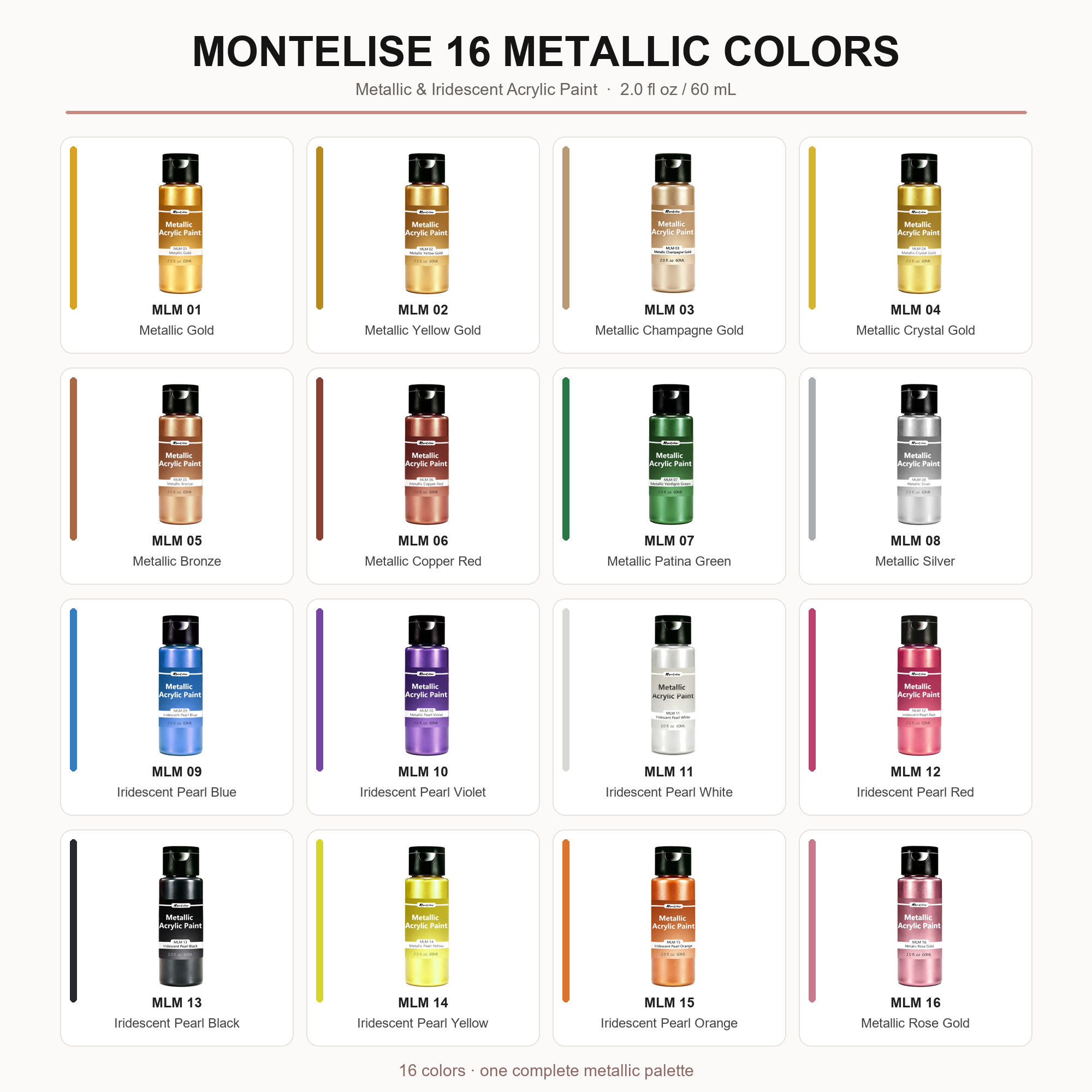
Start with the chart’s product line and version
Open or save the full-resolution reference chart. The original artwork is retained, including the naming discrepancy discussed below.
Record the supplier, product family, chart filename or date, color code and displayed name. Do not assume that the same shade name identifies the same formulation across ordinary, metallic and fluid acrylics. A pouring product also needs its intended mixture and application confirmed separately.
Liquitex provides separate color-chart booklets for different acrylic formats. That is a useful document-control example, not evidence of equivalence between its products and Montelise’s. Start from the relevant range in the Product Center, then request the current supplier reference for that range.
Resolve mismatched codes or names before ordering
The supplied Montelise catalog chart reproduced above contains sixteen entries. At this review, the metallic and pearl acrylic product page displays fifteen numbered shade references. The chart also captions MLM 07 as “Metallic Patina Green,” while the bottle label and current page use “Metallic Verdigris Green.” These differences are reasons to reconcile the records, not evidence that a color is discontinued, renamed or in stock.
Send the code together with both names and the source chart. Ask for the confirmed ordering description and whether the requested color is offered in the chosen format. Do not silently substitute another green or remove the sixteenth reference from your list. Keep any unresolved entry marked “confirmation needed” so it cannot reach label printing as an approved item.
Give every color-and-pack combination its own row
The product page identifies 60 ml flip-top bottles and 100 ml wide-mouth jars as current formats. It also says not to assume every shade is stocked in every pack. Treat these as formats to discuss, not a promise that every chart entry can be supplied immediately.
Use a worksheet like this. The entries below illustrate how to record a request; they are not an accepted quotation or availability statement.
| Field | What to enter | What it prevents |
|---|---|---|
| Product line and chart | Metallic/pearl acrylic; exact chart file | Mixing ordinary and effect-color references |
| Color identity | MLM 07 plus both displayed names; confirmation pending | Ordering by an ambiguous name |
| Selling format | Requested 60 ml bottle or 100 ml jar, separately | Treating a color code as a complete SKU |
| Quantity basis | Units per color, or sets and units per set | Confusing set quantity with bottle quantity |
| Sample reference | Supplier sample code and agreed dried reference | Treating a screen image as final approval |
| Packaging revision | Container, closure and label artwork version | Printing artwork for the wrong pack |
Keep your own retail SKU in a separate column from the supplier’s color code. If a set contains repeated colors or different pack sizes, state that explicitly. Ask for per-color, packaging and set minimums separately; no universal minimum follows from the number of colors shown on a chart.
Use physical samples to settle appearance
Choose colors on screen, but agree the dried reference before bulk approval. Record the intended art surface, application method, dilution or medium, drying conditions and lighting. Color, opacity and metallic effect are separate observations; do not infer one from the other or from a bottle image.
GOLDEN’s iridescent and interference guidance explains that base coats, layer thickness and added mediums can change the appearance of its effect colors. This supports controlling the comparison conditions. It does not establish Montelise’s pigment composition, mixing ratios or performance. Use the acrylic sample approval checklist to record which decisions are accepted and which remain open.
Keep set arithmetic separate from supply approval
In a hypothetical planning example, a buyer wants 120 sets containing six different colors, one bottle of each color per set. The order list therefore needs 120 bottles per color and 720 bottles in total. If the buyer also wants 30 separate replacement bottles of one color, that row becomes 150 bottles and the overall total becomes 750.
These numbers are arithmetic only, not a Montelise MOQ or offer. The buyer still needs confirmation of each color-and-pack combination, loose-unit packing, labels and set packaging. If one color is unavailable, do not assume five-color sets or a substitute shade are acceptable: revise the assortment and obtain approval before changing the order.
Send a reconciled list for an OEM quotation
Send the chart file, product line, code/name list, requested pack per row, quantities, set contents, sample references, label status and destination. Highlight unresolved names or omitted colors rather than hiding them in a general comment. For OEM and private-label supply, request a quotation tied to that version of the list.
Keep the confirmed list with the physical references and artwork. On reorder, identify what stayed the same and what changed, including pack or set composition. The acrylic paint factory guide provides the broader sourcing context; this worksheet supplies the specific color-and-pack decisions needed for the next conversation.